Menú

Mostrar Mensajes

Esta sección te permite ver todos los mensajes escritos por este usuario. Ten en cuenta que sólo puedes ver los mensajes escritos en zonas a las que tienes acceso en este momento.

Mostrar Mensajes Menú

Mensajes - ZanGetsu

#241
Python / Pyscanlogd - Herramienta Escaneo de Puertos
Julio 27, 2013, 04:02:28 AM
Pyscanlogd es una herramienta de detección de escaneo de puertos de red escrito en Python puro. Es capaz de detectar escaneos de puertos más rápidos e incluso puede detectar escaneos de puertos-de mayor duración hasta una hora. Se puede ejecutar en primer plano y registrar escaneos de la consola, así como un daemon al registrar exploraciones en un archivo.

$ sudo pyscanlogd
listening on eth0:


Citar# Regular scan detection

[2010-03-17 17:23:13]: TCP syn scan (flags:6) from 172.16.220.124 to 172.16.220.214
(ports:256,995,554,8080,3389,139,3306,23,111,993,53,1723)
[2010-03-17 17:23:13]: Continuation of TCP syn scan from 172.16.220.124 to
172.16.220.214 (ports:113,199,21,5900,22,1720,135,587,445,2065,6005,3703,631)
[2010-03-17 17:23:13]: Continuation of TCP syn scan from 172.16.220.124 to
172.16.220.214 (ports:4004,1761,1075,4129,7921,33354,255,55600,1600,1065)
...
[2010-03-17 17:23:47]: TCP x-mas scan (flags:41) from 172.16.220.124 to
66.102.13.104 (ports:110,21,111,1720,993,587,3389,143,199,445,8080,80)
[2010-03-17 17:23:50]: Continuation of TCP x-mas scan from 172.16.220.124 to
66.102.13.104 (ports:443,1025,139,1723,554,5900,113,53,80,8080,995,23)
...

Citar# IDLE scan detection

[2010-03-17 17:24:37]: TCP syn scan (flags:2) from 172.16.220.150 to 209.191.122.70
(ports:21,53,8080,445,443,993,3306,995,110,5900,1720,23)
[2010-03-17 17:24:37]: Continuation of TCP syn scan from 172.16.220.150 to 209.191.122.70
(ports:199,8888,554,25,256,22,135,1025,111,587,143)
[2010-03-17 17:24:38]: Continuation of TCP syn scan from 172.16.220.150 to 209.191.122.70
(ports:80,1723,113,3389,139,3828,555,21,53,8080,445,443)
[2010-03-17 17:24:39]: Continuation of TCP syn scan from 172.16.220.150 to 209.191.122.70
(ports:993,3306,995,110,5900,1720,23,199,8888,554,21,53)
[2010-03-17 17:24:45]: Idle scan (flags: 4) from 172.16.220.124 to 209.191.122.70 (ports:
[21, 53, 8080, 445, 443, 993, 3306, 995, 110, 5900, 1720, 23]) using zombie host
172.16.220.150
...

Citar# Slow scan detection

[2010-03-17 17:32:19]: Possible slow TCP x-mas scan (flags:41) from 172.16.220.124
to 64.208.187.107 (ports:1720,113,139,23), average timediff 10.26s

Web de descarga: You are not allowed to view links. You are not allowed to view links. Register or Login or You are not allowed to view links. Register or Login
#242
Python / Knock Subdomain Scan
Julio 26, 2013, 09:23:45 PM

Holas, les paso a dejar esta herramienta llamada Knock, la cual sirve para
encontrar subdominios de un dominio, esta escrito en python,
y tiene soporte para linux y Windows,

Código: python
#!/usr/bin/env python

# -------------------------------------------------------
# Knock v1.5 - 23/08/2011
# By Gianni 'guelfoweb' Amato http://knock.googlecode.com
#
# This code is released under the GNU / GPL v3
# You are free to use, edit and redistribuite it
# under the terms of the GNU / GPL license.
# -------------------------------------------------------

import sys
import os
import httplib
import socket
from time import strftime
import random
import time

wlist_array = ["0","01","02","03","1","10","11","12","13","14","15","16","17","18","19","2","20","3","3com","4","5","6","7","8","9","ILMI","a","a.auth-ns","a01","a02","a1","a2","abc","about","ac","academico","acceso","access","accounting","accounts","acid","activestat","ad","adam","adkit","admin","administracion","administrador","administrator","administrators","admins","ads","adserver","adsl","ae","af","affiliate","affiliates","afiliados","ag","agenda","agent","ai","aix","ajax","ak","akamai","al","alabama","alaska","albuquerque","alerts","alpha","alterwind","am","amarillo","americas","an","anaheim","analyzer","announce","announcements","antivirus","ao","ap","apache","apollo","app","app01","app1","apple","application","applications","apps","appserver","aq","ar","archie","arcsight","argentina","arizona","arkansas","arlington","as","as400","asia","asterix","at","athena","atlanta","atlas","att","au","auction","austin","auth","auto","av","aw","ayuda","az","b","b.auth-ns","b01","b02","b1","b2","b2b","b2c","ba","back","backend","backup","baker","bakersfield","balance","balancer","baltimore","banking","bayarea","bb","bbdd","bbs","bd","bdc","be","bea","beta","bf","bg","bh","bi","billing","biz","biztalk","bj","black","blackberry","blog","blogs","blue","bm","bn","bnc","bo","bob","bof","boise","bolsa","border","boston","boulder","boy","br","bravo","brazil","britian","broadcast","broker","bronze","brown","bs","bsd","bsd0","bsd01","bsd02","bsd1","bsd2","bt","bug","buggalo","bugs","bugzilla","build","bulletins","burn","burner","buscador","buy","bv","bw","by","bz","c","c.auth-ns","ca","cache","cafe","calendar","california","call","calvin","canada","canal","canon","careers","catalog","cc","cd","cdburner","cdn","cert","certificates","certify","certserv","certsrv","cf","cg","cgi","ch","channel","channels","charlie","charlotte","chat","chats","chatserver","check","checkpoint","chi","chicago","ci","cims","cincinnati","cisco","citrix","ck","cl","class","classes","classifieds","classroom","cleveland","clicktrack","client","clientes","clients","club","clubs","cluster","clusters","cm","cmail","cms","cn","co","cocoa","code","coldfusion","colombus","colorado","columbus","com","commerce","commerceserver","communigate","community","compaq","compras","con","concentrator","conf","conference","conferencing","confidential","connect","connecticut","consola","console","consult","consultant","consultants","consulting","consumer","contact","content","contracts","core","core0","core01","corp","corpmail","corporate","correo","correoweb","cortafuegos","counterstrike","courses","cr","cricket","crm","crs","cs","cso","css","ct","cu","cust1","cust10","cust100","cust101","cust102","cust103","cust104","cust105","cust106","cust107","cust108","cust109","cust11","cust110","cust111","cust112","cust113","cust114","cust115","cust116","cust117","cust118","cust119","cust12","cust120","cust121","cust122","cust123","cust124","cust125","cust126","cust13","cust14","cust15","cust16","cust17","cust18","cust19","cust2","cust20","cust21","cust22","cust23","cust24","cust25","cust26","cust27","cust28","cust29","cust3","cust30","cust31","cust32","cust33","cust34","cust35","cust36","cust37","cust38","cust39","cust4","cust40","cust41","cust42","cust43","cust44","cust45","cust46","cust47","cust48","cust49","cust5","cust50","cust51","cust52","cust53","cust54","cust55","cust56","cust57","cust58","cust59","cust6","cust60","cust61","cust62","cust63","cust64","cust65","cust66","cust67","cust68","cust69","cust7","cust70","cust71","cust72","cust73","cust74","cust75","cust76","cust77","cust78","cust79","cust8","cust80","cust81","cust82","cust83","cust84","cust85","cust86","cust87","cust88","cust89","cust9","cust90","cust91","cust92","cust93","cust94","cust95","cust96","cust97","cust98","cust99","customer","customers","cv","cvs","cx","cy","cz","d","dallas","data","database","database01","database02","database1","database2","databases","datastore","datos","david","db","db0","db01","db02","db1","db2","dc","de","dealers","dec","def","default","defiant","delaware","dell","delta","delta1","demo","demonstration","demos","denver","depot","des","desarrollo","descargas","design","designer","detroit","dev","dev0","dev01","dev1","devel","develop","developer","developers","development","device","devserver","devsql","dhcp","dial","dialup","digital","dilbert","dir","direct","directory","disc","discovery","discuss","discussion","discussions","disk","disney","distributer","distributers","dj","dk","dm","dmail","dmz","dnews","dns","dns-2","dns0","dns1","dns2","dns3","do","docs","documentacion","documentos","domain","domains","dominio","domino","dominoweb","doom","download","downloads","downtown","dragon","drupal","dsl","dyn","dynamic","dynip","dz","e","e-com","e-commerce","e0","eagle","earth","east","ec","echo","ecom","ecommerce","edi","edu","education","edward","ee","eg","eh","ejemplo","elpaso","email","employees","empresa","empresas","en","enable","eng","eng01","eng1","engine","engineer","engineering","enterprise","epsilon","er","erp","es","esd","esm","espanol","estadisticas","esx","et","eta","europe","events","domain","exchange","exec","extern","external","extranet","f","f5","falcon","farm","faststats","fax","feedback","feeds","fi","field","file","files","fileserv","fileserver","filestore","filter","find","finger","firewall","fix","fixes","fj","fk","fl","flash","florida","flow","fm","fo","foobar","formacion","foro","foros","fortworth","forum","forums","foto","fotos","foundry","fox","foxtrot","fr","france","frank","fred","freebsd","freebsd0","freebsd01","freebsd02","freebsd1","freebsd2","freeware","fresno","front","frontdesk","fs","fsp","ftp","ftp-","ftp0","ftp2","ftp_","ftpserver","fw","fw-1","fw1","fwsm","fwsm0","fwsm01","fwsm1","g","ga","galeria","galerias","galleries","gallery","games","gamma","gandalf","gate","gatekeeper","gateway","gauss","gd","ge","gemini","general","george","georgia","germany","gf","gg","gh","gi","gl","glendale","gm","gmail","gn","go","gold","goldmine","golf","gopher","gp","gq","gr","green","group","groups","groupwise","gs","gsx","gt","gu","guest","gw","gw1","gy","h","hal","halflife","hawaii","hello","help","helpdesk","helponline","henry","hermes","hi","hidden","hk","hm","hn","hobbes","hollywood","home","homebase","homer","honeypot","honolulu","host","host1","host3","host4","host5","hotel","hotjobs","houstin","houston","howto","hp","hpov","hr","ht","http","https","hu","hub","humanresources","i","ia","ias","ibm","ibmdb","id","ida","idaho","ids","ie","iis","il","illinois","im","images","imail","imap","imap4","img","img0","img01","img02","in","inbound","inc","include","incoming","india","indiana","indianapolis","info","informix","inside","install","int","intern","internal","international","internet","intl","intranet","invalid","investor","investors","invia","invio","io","iota","iowa","iplanet","ipmonitor","ipsec","ipsec-gw","iq","ir","irc","ircd","ircserver","ireland","iris","irvine","irving","is","isa","isaserv","isaserver","ism","israel","isync","it","italy","ix","j","japan","java","je","jedi","jm","jo","jobs","john","jp","jrun","juegos","juliet","juliette","juniper","k","kansas","kansascity","kappa","kb","ke","kentucky","kerberos","keynote","kg","kh","ki","kilo","king","km","kn","knowledgebase","knoxville","koe","korea","kp","kr","ks","kw","ky","kz","l","la","lab","laboratory","labs","lambda","lan","laptop","laserjet","lasvegas","launch","lb","lc","ldap","legal","leo","li","lib","library","lima","lincoln","link","linux","linux0","linux01","linux02","linux1","linux2","lista","lists","listserv","listserver","live","lk","load","loadbalancer","local","localhost","log","log0","log01","log02","log1","log2","logfile","logfiles","logger","logging","loghost","login","logs","london","longbeach","losangeles","lotus","louisiana","lr","ls","lt","lu","luke","lv","ly","lyris","m","ma","mac","mac1","mac10","mac11","mac2","mac3","mac4","mac5","mach","macintosh","madrid","mail","mail2","mailer","mailgate","mailhost","mailing","maillist","maillists","mailroom","mailserv","mailsite","mailsrv","main","maine","maint","mall","manage","management","manager","manufacturing","map","mapas","maps","marketing","marketplace","mars","marvin","mary","maryland","massachusetts","master","max","mc","mci","md","mdaemon","me","media","member","members","memphis","mercury","merlin","messages","messenger","mg","mgmt","mh","mi","miami","michigan","mickey","midwest","mike","milwaukee","minneapolis","minnesota","mirror","mis","mississippi","missouri","mk","ml","mm","mn","mngt","mo","mobile","mom","monitor","monitoring","montana","moon","moscow","movies","mozart","mp","mp3","mpeg","mpg","mq","mr","mrtg","ms","ms-exchange","ms-sql","msexchange","mssql","mssql0","mssql01","mssql1","mt","mta","mtu","mu","multimedia","music","mv","mw","mx","my","mysql","mysql0","mysql01","mysql1","mz","n","na","name","names","nameserv","nameserver","nas","nashville","nat","nc","nd","nds","ne","nebraska","neptune","net","netapp","netdata","netgear","netmeeting","netscaler","netscreen","netstats","network","nevada","new","newhampshire","newjersey","newmexico","neworleans","news","newsfeed","newsfeeds","newsgroups","newton","newyork","newzealand","nf","ng","nh","ni","nigeria","nj","nl","nm","nms","nntp","no","node","nokia","nombres","nora","north","northcarolina","northdakota","northeast","northwest","noticias","novell","november","np","nr","ns","ns-","ns0","ns01","ns02","ns1","ns2","ns3","ns4","ns5","ns_","nt","nt4","nt40","ntmail","ntp","ntserver","nu","null","nv","ny","nz","o","oakland","ocean","odin","office","offices","oh","ohio","ok","oklahoma","oklahomacity","old","om","omaha","omega","omicron","online","ontario","open","openbsd","openview","operations","ops","ops0","ops01","ops02","ops1","ops2","opsware","or","oracle","orange","order","orders","oregon","orion","orlando","oscar","out","outbound","outgoing","outlook","outside","ov","owa","owa01","owa02","owa1","owa2","ows","oxnard","p","pa","page","pager","pages","paginas","papa","paris","parners","partner","partners","patch","patches","paul","payroll","pbx","pc","pc01","pc1","pc10","pc101","pc11","pc12","pc13","pc14","pc15","pc16","pc17","pc18","pc19","pc2","pc20","pc21","pc22","pc23","pc24","pc25","pc26","pc27","pc28","pc29","pc3","pc30","pc31","pc32","pc33","pc34","pc35","pc36","pc37","pc38","pc39","pc4","pc40","pc41","pc42","pc43","pc44","pc45","pc46","pc47","pc48","pc49","pc5","pc50","pc51","pc52","pc53","pc54","pc55","pc56","pc57","pc58","pc59","pc6","pc60","pc7","pc8","pc9","pcmail","pda","pdc","pe","pegasus","pennsylvania","peoplesoft","personal","pf","pg","pgp","ph","phi","philadelphia","phoenix","phoeniz","phone","phones","photos","pi","pics","pictures","pink","pipex-gw","pittsburgh","pix","pk","pki","pl","plano","platinum","pluto","pm","pm1","pn","po","policy","polls","pop","pop3","portal","portals","portfolio","portland","post","posta","posta01","posta02","posta03","postales","postoffice","ppp1","ppp10","ppp11","ppp12","ppp13","ppp14","ppp15","ppp16","ppp17","ppp18","ppp19","ppp2","ppp20","ppp21","ppp3","ppp4","ppp5","ppp6","ppp7","ppp8","ppp9","pptp","pr","prensa","press","print >> sys.stdout,er","print >> sys.stdout,serv","print >> sys.stdout,server","priv","privacy","private","problemtracker","products","profiles","project","projects","promo","proxy","prueba","pruebas","ps","psi","pss","pt","pub","public","pubs","purple","pw","py","q","qa","qmail","qotd","quake","quebec","queen","quotes","r","r01","r02","r1","r2","ra","radio","radius","rapidsite","raptor","ras","rc","rcs","rd","re","read","realserver","recruiting","red","redhat","ref","reference","reg","register","registro","registry","regs","relay","rem","remote","remstats","reports","research","reseller","reserved","resumenes","rho","rhodeisland","ri","ris","rmi","ro","robert","romeo","root","rose","route","router","router1","rs","rss","rtelnet","rtr","rtr01","rtr1","ru","rune","rw","rwhois","s","s1","s2","sa","sac","sacramento","sadmin","safe","sales","saltlake","sam","san","sanantonio","sandiego","sanfrancisco","sanjose","saskatchewan","saturn","sb","sbs","sc","scanner","schedules","scotland","scotty","sd","se","search","seattle","sec","secret","secure","secured","securid","security","sendmail","seri","serv","serv2","server","server1","servers","service","services","servicio","servidor","setup","sg","sh","shared","sharepoint","shareware","shipping","shop","shoppers","shopping","si","siebel","sierra","sigma","signin","signup","silver","sim","sirius","site","sj","sk","skywalker","sl","slackware","slmail","sm","smc","sms","smtp","smtphost","sn","sniffer","snmp","snmpd","snoopy","snort","so","socal","software","sol","solaris","solutions","soporte","source","sourcecode","sourcesafe","south","southcarolina","southdakota","southeast","southwest","spain","spam","spider","spiderman","splunk","spock","spokane","springfield","sprint >> sys.stdout,","sqa","sql","sql0","sql01","sql1","sql7","sqlserver","squid","sr","ss","ssh","ssl","ssl0","ssl01","ssl1","st","staff","stage","staging","start","stat","static","statistics","stats","stlouis","stock","storage","store","storefront","streaming","stronghold","strongmail","studio","submit","subversion","sun","sun0","sun01","sun02","sun1","sun2","superman","supplier","suppliers","support","sv","sw","sw0","sw01","sw1","sweden","switch","switzerland","sy","sybase","sydney","sysadmin","sysback","syslog","syslogs","system","sz","t","tacoma","taiwan","talk","tampa","tango","tau","tc","tcl","td","team","tech","technology","techsupport","telephone","telephony","telnet","temp","tennessee","terminal","terminalserver","termserv","test","test2k","testbed","testing","testlab","testlinux","testo","testserver","testsite","testsql","testxp","texas","tf","tftp","tg","th","thailand","theta","thor","tienda","tiger","time","titan","tivoli","tj","tk","tm","tn","to","tokyo","toledo","tom","tool","tools","toplayer","toronto","tour","tp","tr","tracker","train","training","transfers","trinidad","trinity","ts","ts1","tt","tucson","tulsa","tumb","tumblr","tunnel","tv","tw","tx","tz","u","ua","uddi","ug","uk","um","uniform","union","unitedkingdom","unitedstates","unix","unixware","update","updates","upload","ups","upsilon","uranus","urchin","us","usa","usenet","user","users","ut","utah","utilities","uy","uz","v","va","vader","vantive","vault","vc","ve","vega","vegas","vend","vendors","venus","vermont","vg","vi","victor","video","videos","viking","violet","vip","virginia","vista","vm","vmserver","vmware","vn","vnc","voice","voicemail","voip","voyager","vpn","vpn0","vpn01","vpn02","vpn1","vpn2","vt","vu","w","w1","w2","w3","wa","wais","wallet","wam","wan","wap","warehouse","washington","wc3","web","webaccess","webadmin","webalizer","webboard","webcache","webcam","webcast","webdev","webdocs","webfarm","webhelp","weblib","weblogic","webmail","webmaster","webproxy","webring","webs","webserv","webserver","webservices","website","websites","websphere","websrv","websrvr","webstats","webstore","websvr","webtrends","welcome","west","westvirginia","wf","whiskey","white","whois","wi","wichita","wiki","wililiam","win","win01","win02","win1","win2","win2000","win2003","win2k","win2k3","windows","windows01","windows02","windows1","windows2","windows2000","windows2003","windowsxp","wingate","winnt","winproxy","wins","winserve","winxp","wire","wireless","wisconsin","wlan","wordpress","work","world","write","ws","ws1","ws10","ws11","ws12","ws13","ws2","ws3","ws4","ws5","ws6","ws7","ws8","ws9","wusage","wv","ww","www","www-","www-01","www-02","www-1","www-2","www-int","www0","www01","www02","www1","www2","www3","www_","wwwchat","wwwdev","wwwmail","wy","wyoming","x","x-ray","xi","xlogan","xmail","xml","xp","y","yankee","ye","yellow","young","yt","yu","z","z-log","za","zebra","zera","zeus","zlog","zm","zulu","zw"]

def zonetransfer(URL): # Zone Transfer
try:
import dns.query, dns.zone, dns.resolver
print >> sys.stdout, "[+] Getting NS records for", URL+"\n"
answers = dns.resolver.query(URL, 'NS')
ns = []
for rdata in answers:
n = str(rdata)
print >> sys.stdout, "\tFound name server:", n
ns.append(n)
print >> sys.stdout
for n in ns:
print >> sys.stdout, "[+] Trying a zone transfer for %s from name server %s" % (URL, n)
try:
  zone = dns.zone.from_xfr(dns.query.xfr(ns[0], URL))
  for name, node in zone.nodes.items():
      rdataset = node.rdatasets
      for record in rdataset:
          print >> sys.stdout, "\n%s\t%s" % (name, record)
  #break
  print >> sys.stdout
except:
  pass

except(ImportError):
print >> sys.stdout, "\nSorry, dnspython module missing."
print >> sys.stdout, "\tDownload dnspython module from [ http://www.dnspython.org/ ]\n"
sys.exit(0)

def rnd(): # Random String
alphabet = 'abcdefghijklmnopqrstuvwxyz'
min = 5
max = 15
total = 2
global rndString
for count in xrange(1,total):
  for x in random.sample(alphabet,random.randint(min,max)):
      rndString+=x

errcode=''
def get_url(host): # Test Wildcard
try:
h = httplib.HTTP(host)
h.putrequest('GET', '/')
h.putheader('Accept', 'text/xml')
h.putheader('User-Agent', 'knock.py')
h.endheaders()
global errcode
errcode, errmsg, headers = h.getreply()
f = h.getfile()
global data
data = f.read() # Get HTML Data
#print >> sys.stdout, data
f.close()
h.close()
print >> sys.stdout, line+"."+URL
except:
pass

def bypasswildcard(URL,EXCLUDE): # bypass wildcard, use internal wordlist
hostlist = ''
count = 0
print >> sys.stdout, "[+] Bypass wildcard"
startTime = time.time()
for line in wlist_array:
get_url(line+'.'+URL)
if not EXCLUDE in data:
count = count + 1
subdomain = line+"."+URL
print >> sys.stdout, "".join([s.center(25) for s in (subdomain,'')])

seconds = time.time() - t
print >> sys.stdout, "\nFound %s subdomain(s) in %s second(s)" % (str(count),str(round(seconds,2)))

def bypasswildcardwl(URL,EXCLUDE,WORDLIST): # bypass wildcard, use external wordlist
hostlist = ''
count = 0
print >> sys.stdout, "[+] Bypass wildcard"
startTime = time.time()
try:
wordlist = open(WORDLIST,'r')
wlist = wordlist.read().split('\n')
#timestimed = len(wlist) * endTime
except:
print >> sys.stdout, "[!] Error wordlist\n\n\tNo wordlist. File not found."
sys.exit(0)
for line in wlist:
if line != '':
get_url(line+'.'+URL)
if not EXCLUDE in data:
count = count + 1
subdomain = line+"."+URL
print >> sys.stdout, "".join([s.center(25) for s in (subdomain,'')])


seconds = time.time() - t
print >> sys.stdout, "\nFound %s subdomain(s) in %s second(s)" % (str(count),str(round(seconds,2)))


def subdomainAuto(URL): # wordlist by array
domain = ''
hostlist = ''
count = 0
totcount = 0
print >> sys.stdout, "\n[+] Scanning for subdomain on " + str(URL)
print >> sys.stdout, "[!] Wordlist not specified. I scannig with my internal wordlist..."
timestimed = len(wlist_array) * endTime
print >> sys.stdout, "    Estimated time about "+str(round(timestimed,2))+" seconds\n"
print >> sys.stdout, "".join([s.center(25) for s in ("Subdomain","Ip address","Name server\n")])
for line in wlist_array:
try:
s = socket.gethostbyname(line+"."+URL)
if (s):
soc = socket.gethostbyname_ex(line+"."+URL)
if (soc):
dnsarray = len(soc[2])
for dns in range(0, dnsarray):
name = socket.gethostbyaddr(soc[2][dns])

if hostlist.find(s) < 0:
count = count + 1
totcount = totcount + 1
subdomain = line+"."+URL
print >> sys.stdout, "".join([s.center(25) for s in (subdomain,soc[2][dns],name[0])])

soc.close()
s.close()
except:
pass
seconds = time.time() - t
print >> sys.stdout, "\nFound %s subdomain(s) in %s host(s) in %s second(s)" % (str(totcount),str(count),str(round(seconds,2)))


def subdomain(URL, WORDLIST): # wordlist by file
hostlist = ''
count = 0
totcount = 0
try:
wordlist = open(WORDLIST,'r')
wlist = wordlist.read().split('\n')
timestimed = len(wlist) * endTime
except:
print >> sys.stdout, "[!] Error wordlist\n\n\tNo wordlist. File not found."
sys.exit(0)
print >> sys.stdout, "[+] Scanning for subdomain on " + str(URL)
print >> sys.stdout, "\tEstimated time about "+str(round(timestimed,2))+" seconds\n"
print >> sys.stdout, "".join([s.center(25) for s in ("Subdomain","Ip address","Name server\n")])
for line in wlist:
try:
s = socket.gethostbyname(line+"."+URL)
if (s):
soc = socket.gethostbyname_ex(line+"."+URL)
if (soc):
dnsarray = len(soc[2])
for dns in range(0, dnsarray):
name = socket.gethostbyaddr(soc[2][dns])

if hostlist.find(s) < 0:
count = count + 1
totcount = totcount + 1
subdomain = line+"."+URL
print >> sys.stdout, "".join([s.center(25) for s in (subdomain,soc[2][dns],name[0])])

soc.close()
s.close()
except:
pass
wordlist.close()
seconds = time.time() - t
print >> sys.stdout, "\nFound %s subdomain(s) in %s host(s) in %s second(s)" % (str(totcount),str(count),str(round(seconds,2)))


def help():
print >> sys.stdout, "USAGE:"
print >> sys.stdout, "\tScanning with internal wordlist:"
print >> sys.stdout, "\t\tknock [url]\n\t\te.g.\tknock domain.com"
print >> sys.stdout, "\tScanning with external wordlist:"
print >> sys.stdout, "\t\tknock [url] [wordlist]\n\t\te.g.\tknock domain.com wordlist.txt"
print >> sys.stdout, "OPTIONS:\n"
print >> sys.stdout, "\t-zt\tZone Transfer discovery:"
print >> sys.stdout, "\t\tknock -zt [url]\n\t\te.g.\tknock -zt domain.com"
print >> sys.stdout, "\t-wc\tWildcard testing:"
print >> sys.stdout, "\t\tknock -wc [url]\n\t\te.g.\tknock -wc domain.com"
print >> sys.stdout, "\t-dns\tDns resolving:"
print >> sys.stdout, "\t\tknock -dns [url]\n\t\te.g.\tknock -dns domain.com"
print >> sys.stdout, "\t-bw\tBypass wildcard:"
print >> sys.stdout, "\t\tknock -bw [stringexclude] [url]\n\t\te.g.\tknock -bw 404 domain.com"
sys.exit()

def testdomain():
try:
stest = socket.gethostbyname("www."+URL)
if (stest):
print >> sys.stdout, "[+] Testing domain"
domaintest = "\twww."+URL
stest = stest
print >> sys.stdout, "".join([s.center(25) for s in (domaintest, stest)])
except:
help()
#print >> sys.stdout, "Error:\n\tHost not valid."
#sys.exit(0)

def testwildcard():
print >> sys.stdout, "[+] Testing wildcard"
a = 0
global rndString
global errcode
global endTime
startTime = time.time()
rndString=''
rnd()
#print >> sys.stdout, rndString
get_url(rndString+'.'+URL) # test wildcard
#print >> sys.stdout, errcode
endTime = (time.time() - startTime) / 4
if errcode <> '':
print >> sys.stdout, data
#print >> sys.stdout, "\tRequest response:", errcode
print >> sys.stdout, '\tWildcard enabled! Try with -bw option'
print >> sys.stdout, '\tExample: knock -bw 404 '+URL
sys.exit(0)
else:
print >> sys.stdout, "\tOk, no wildcard found."

def dnsresolve(foo):
print >> sys.stdout, "[+] Dns resolving"
try:
s_dns = socket.gethostbyname_ex(foo)
if (s_dns):
print >> sys.stdout, "".join([s.center(25) for s in ("Domain name","Ip address","Name server")])
dnsarray = len(s_dns[2])
for dns in range(0, dnsarray):
name = socket.gethostbyaddr(s_dns[2][dns])
print >> sys.stdout, "".join([s.center(25) for s in (foo, s_dns[2][dns], name[0] )])
print >> sys.stdout, "Found "+str(dnsarray)+" host(s) for "+foo
except:
print >> sys.stdout, "\tNo address associated with hostname " + foo
pass


################### MAIN ######################


print >> sys.stdout, "Knock v1.5 by Gianni 'guelfoweb' Amato ( http://knock.googlecode.com )\n"

if len(sys.argv) < 2 or len(sys.argv) > 5:
help()

if len(sys.argv) == 2:
URL = sys.argv[1]
t = time.time()
testdomain()
dnsresolve(URL)
testwildcard()
subdomainAuto(URL)
sys.exit(0)


if len(sys.argv) == 3:
URL = sys.argv[2]
if sys.argv[1] == '-td': # Testing domain (out of help)
testdomain()
#dnsresolve(URL)
sys.exit(0)
if sys.argv[1] == '-zt': # Zone Transfer
testdomain()
dnsresolve(URL)
zonetransfer(URL)
sys.exit(0)
if sys.argv[1] == '-wc': # Wildcard
testdomain()
testwildcard()
sys.exit(0)
if sys.argv[1] == '-dns': # Dns resolve
testdomain()
dnsresolve(URL)
sys.exit(0)

if len(sys.argv) == 4 and sys.argv[1] == '-bw':
EXCLUDE = sys.argv[2]
URL = sys.argv[3]
t = time.time()
testdomain()
dnsresolve(URL)
bypasswildcard(URL,EXCLUDE)
sys.exit(0)

if len(sys.argv) == 5 and sys.argv[1] == '-bw':
EXCLUDE = sys.argv[2]
URL = sys.argv[3]
WORDLIST = sys.argv[4]
t = time.time()
testdomain()
dnsresolve(URL)
bypasswildcardwl(URL,EXCLUDE,WORDLIST)
sys.exit(0)
else:
URL = sys.argv[1]
t = time.time()
testdomain()
dnsresolve(URL)
testwildcard()
WORDLIST = sys.argv[2]
subdomain(URL, WORDLIST)
sys.exit(0)


Las características actuales:

Scan subdominios
Solicitud de DNS para la transferencia de zona
Resolución de DNS
Pruebas Comodín
Derivación Comodín


Es necesaria la instalacion de python,

Web de Descargas: You are not allowed to view links. You are not allowed to view links. Register or Login or You are not allowed to view links. Register or Login

Saludos !
#243
Bugs y Exploits / Re:Sqlmap + Coak
Julio 26, 2013, 09:20:18 AM
Muy Buen aporte bro ! (Y)
#244
Bugs y Exploits / Re:Full Source Disclosure por SQLI
Julio 25, 2013, 04:31:38 AM
Muy Bueno el post bro ! !
#245
muy bueno, se agradece :D
#246
feliz dia a todos  !!! !!
#247
Smooth-Sec es un sistema de detección de intrusiones IDS / IPS cuyo motor está basado en Suricata y con una interface web Snorby.


Está montado sobre Linux UBUNTU 10.04 LTS. Se trada de un sistema completamente configurado y listo para usarse.  Creado por Phillip Bailey.

los dos principales componentes de Smooth-Sec:  Suricata y Snorby.

Suricata:

Se trata de motor IDS/IPS de The Open Information Security Foundation. Es Open Source y tiene unas características especiales que hacen de Suricata un motor muy interesante. Además es totalmente compatible con las reglas Snort y Emerging Threads.

Destacamos entre las características de Suricata:

Multi-Threaded Processing. Una de la  características más importantes de Suricata que permite la ejecución de varios procesos / subprocesos de forma simultánea. Podemos entonces asignar el número de subprocesos por CPU / Cores y qué subprocesos. De esta forma es capaz, entre otras cosas, de porcesar una gran cantidad de paquetes de forma simultánea aumentando así el rendimiento.


Automatic Protocol Detection. A parte de los protocolos IP, TCP, UDP e ICMP, Suricata tiene palabras claves para otros protocolos como FTP, HTTP, TLS, SMB.  De esa forma podemos escribir reglas independientemente del puerto que un protocolo use, ya sea por defecto o no ya que éste es automáticamente detectado.

Performance Statistics. Estadísticas y análisis de rendimiento. Estas estádísticas se vuelcan el en archivo /var/log/suricata/stat.log.

HTTP Log Module. Suricata, independientemente de las alertas, vuelca todas las peticiones HTTP (tanto desde HOME_NET > EXTERNAl_NET como en el sentido ciontrario) en un archivo /var/log/http.log. El registro de estas peticiones se almacenan en formato de Log Apache.

Descompresión Gzip por parte del analizador HTTP.

Soporta, al igual que Snort, Unified2 Output.

Soporta IPv6.

Snorby:

Snorby es un front-end web, para la gestión de alertas IDS/IPS basado en sensores. En el caso de Smooth-Sec basado en motor Suricata. Su interface gráfica es muy sencilla con una visión amplia e intuitiva de la visualización de las alertas.

En resúmen, con Snorby podemos tener una visión rápida de las alertas generadas por los distintos sensores suricata mediante una interfaz intuitiva y atractiva.

La versión que usa Smooth-Sec de Snorby es 2.2.5

Instalación de Smooth-Sec.
Descargamos la .iso desde aquí: You are not allowed to view links. You are not allowed to view links. Register or Login or You are not allowed to view links. Register or Login
Instalamos un una máquina física o mediante VMWare.

Una vez que arrancamos con la .iso:

- usamos la opción de install to hard disk.
- la instalacion es muy sencilla e incluye las operaciones normales de una instalación Debian / Ubuntu, tales como configuración de particiones, guiadas o no,  GRUB , etc.
- una vez realizada la instalación reiniciamos.
- indicamos password para la cuenta root.
- seguimos las indiocacio nes de la instalación.
- configuramos la interface de red.
- reinciamos.
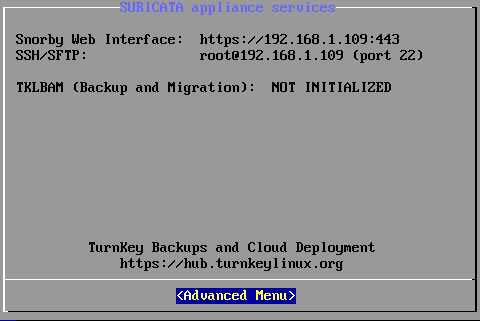
- una pantalla nos indica, en base a la IP configurada, la fora de acceder a la interface web Snorby mediante https (02).


En esta misma pantalla: Advanced Menu > Quit, podemos acceder a línea de comandos para la configuración avanzada de Smooth-Sec.
accedemos mediante https://IP:443/ y se nos pide usuario y contraseña que serán : You are not allowed to view links. You are not allowed to view links. Register or Login or You are not allowed to view links. Register or Login / snorby.
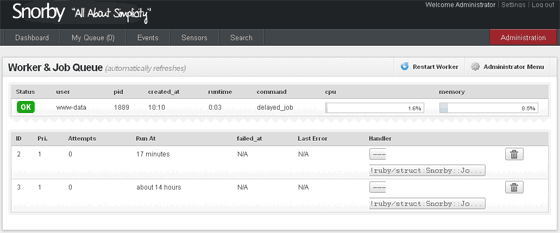
Smooth-Sec funcionando.
Desde el Dashboard o pantalla principal de Snorby > Administración (arriba derecha en rojo) > Administrator menu > Worker & JoB Queue, vemos que todo está correcto y funcionando:


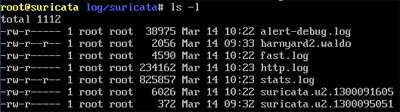
Vemos que también se están generando los archivos de alerta en /var/log/suricata así como el formato unified2 para Snorby:


fuente: You are not allowed to view links. You are not allowed to view links. Register or Login or You are not allowed to view links. Register or Login
Un poco de configuracion de snort aqui : You are not allowed to view links. You are not allowed to view links. Register or Login or You are not allowed to view links. Register or Login

Suricata : You are not allowed to view links. You are not allowed to view links. Register or Login or You are not allowed to view links. Register or Login

Saludos !
#248
Underc0de / Re:Biblioteca Virtual | Underc0de
Julio 13, 2013, 09:15:15 PM
esta muy buena :D
#249
muy bueno gracias :D
#250
Python / Zarp - Network Attack Framework
Julio 10, 2013, 02:31:24 AM
Zarp es una herramienta escrita en python de ataque a redes en entornos locales. Posee varias herramientas
como sniffers los cuales permiten analizar automáticamente los nombres de usuario y contraseñas de diversos protocolos,
así como ver el tráfico HTTP y más.

entre sus funciones estan:

- Poisoners
- Parameter
- Services
- Sessions
- Scanners
- DoS Attacks
- Sniffers


Descarga: git clone You are not allowed to view links. You are not allowed to view links. Register or Login or You are not allowed to view links. Register or Login
Mas informacion: You are not allowed to view links. You are not allowed to view links. Register or Login or You are not allowed to view links. Register or Login
You are not allowed to view links. You are not allowed to view links. Register or Login or You are not allowed to view links. Register or Login

Saludos !
#251
Bugs y Exploits / FG-Inyector Framework
Julio 03, 2013, 03:23:58 AM
Holas, les paso a dejar una tool las cual nos ayudara
en nuestras tareas de pentest sql injection, aqui una toma:


Web del proyecto : You are not allowed to view links. You are not allowed to view links. Register or Login or You are not allowed to view links. Register or Login

Saludos !
#252
Presentaciones y cumpleaños / Re:Que tal!
Julio 01, 2013, 06:43:43 PM
bienvenido, disfruta de la comunidad
#253
Presentaciones y cumpleaños / Re:Hola!
Julio 01, 2013, 03:54:43 PM
bienvenido amigo !
#254
Delphi / Re:[Delphi] Project File X 0.2
Junio 29, 2013, 02:12:03 PM
se ve muy bueno, lo probaré, gracias  !
#255

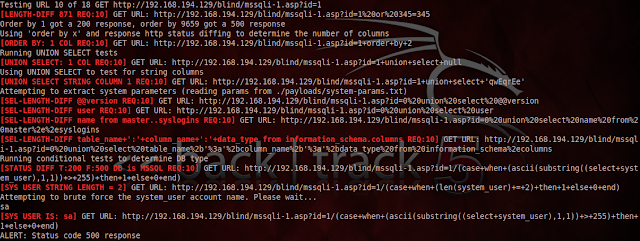
Sqlifuzzer  es un escáner de línea de comandos que busca identificar las vulnerabilidades de inyección SQL.

Características:
- Payloads / pruebas para numéricos, de cadena, de error y basada en el tiempo de inyección SQL
- Soporte para MSSQL, MySQL y Oracle DBMS
- Las pruebas automatizadas de parámetros 'difíciles' Like Post consulta URL y mulipart parámetros del formulario
- Una gama de opciones de evasión de filtros:
variación caso, la codificación URL de anidación, dobles, comentarios sobre los espacios, 'así como' de 'es igual a' operador, caracteres intermedios, nula y prefijos CRLF, el método HTTP intercambio (Se convierten los mensajes / mensajes se convierten GETS)
- ORDER BY y SELECT UNION pruebas sobre los parámetros vulnerables a:
- enumerar seleccionar los números de las columnas de consulta
- columnas de cadena de tipo de datos identificar en las consultas de selección
- extraer el esquema de base de datos y la información de configuración
- Las pruebas condicionales para extraer información DBMS cuando la extracción de datos a través UNION SELECT falla (es decir, sin las columnas de tipo cadena)
- Pruebas basadas retardo de tiempo para extraer información DBMS cuando la extracción de datos a través de métodos no condicionales (es decir, escenarios totalmente ciegos)
- Ensayo de inyección XPath respuesta basada Boole y extracción de datos
- Apoyo para la detección automatizada y pruebas de parámetros en la POST URI y los impresos de varias
Mantenimiento "estado" Scan:
- Detener una exploración en cualquier momento - se guarda el progreso del análisis y puede volver fácilmente a un análisis desde la URL que se detuvo
- Especifique un número de solicitud específica para continuar la exploración desde
- Excepción facultativa de una lista personalizable de parámetros del análisis ámbito
- El seguimiento de los parámetros analizados y la evitación de re-escaneo parámetros analizados
- Formato HTML de salida con:
links / botones para enviar comprobante de peticiones de inyección SQL Concepto
- enlaces a archivos de diferencia de respuesta y los datos extraídos

Descarga: You are not allowed to view links. You are not allowed to view links. Register or Login or You are not allowed to view links. Register or Login
#256
Bugs y Exploits / Jsky - Web Vulnerability Scanner
Junio 26, 2013, 09:58:55 PM
Jsky es un escáner de vulnerabilidades web, herramienta de evaluación de vulnerabilidades de aplicaciones web.

¿Qué puede hacer jsky?
Es un escáner de vulnerabilidades de seguridad de aplicaciones Web, por lo que puede escanear estas vulnerabilidades de seguridad en aplicaciones Web:
* Inyección de SQL
* Cross-Site Scripting
* Indexación Inseguro
* divulgación Ruta local
* Servidor de configuración errónea
* y todo lo que las amenazas de aplicación.


15 días totalmente funcional (ninguna limitación) Trial

Descarga:
You are not allowed to view links. You are not allowed to view links. Register or Login or You are not allowed to view links. Register or Login
#257
Presentaciones y cumpleaños / Re:Hola :)
Junio 25, 2013, 07:21:21 PM
bienvenido amigo, que lo pases de 10  ;)
#258
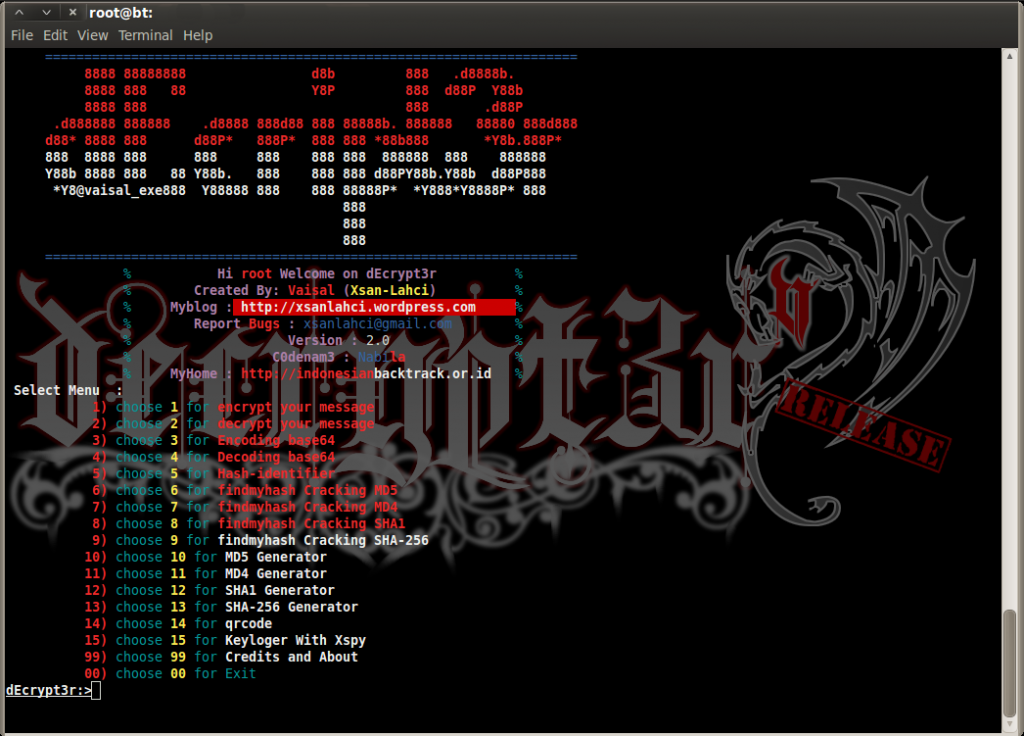
Python / dEcrypt3r V.2
Junio 25, 2013, 01:57:44 AM
Hola les paso a dejar esta herramienta escrita en python,


contiene:

1. encrypt & decrypt message with cryptography Subtitution method

2. Encoding & decoding base64

3. Hash-identifier

4. Cracking Hash MD5 , MD4 , SHA1 , SHA-256 with findmyhash on dEcrypt3r V2

5. MD5 , MD4 , SHA1 , SHA-256 Generator

6. Make Qrcode with Qrencode on dEcrypt3r V2

7. Keyloger With xspy on dEcrypt3r V2

descarga: You are not allowed to view links. You are not allowed to view links. Register or Login or You are not allowed to view links. Register or Login

Saludos !
#259
You are not allowed to view links. You are not allowed to view links. Register or Login or You are not allowed to view links. Register or Login
Excelente aporte, te edito el post y te coloco la etiqueta del vídeo ;)
Un saludo ~

gracias bro  ;)
#260

Bueno para instalar lighttpd primero nos logeamos como root, su y
nuestra pass, seguidamente dependiendo de nuestro sistema ( x86_64 o i386 ):

x86_64:

Código: text
    - wget http://packages.sw.be/rpmforge-release/rpmforge-release-0.5.2-2.el6.rf.x86_64.rpm
    - rpm -Uhv rpmforge-release-0.5.2-2.el6.rf.x86_64.rpm


i386

Código: text
    - wget http://packages.sw.be/rpmforge-release/rpmforge-release-0.5.2-2.el6.rf.i386.rpm
    - rpm -Uhv rpmforge-release-0.5.2-2.el6.rf.i386.rpm


Luego de eso a instalar : yum install lighttpd

Seguido procederemos a iniciarlo :

Código: text
    - chkconfig --levels 235 lighttpd on
    - /etc/init.d/lighttpd start


Con esto ya nos saldra nuestro primer error :

Iniciando lighttpd: 2013-06-22 18:35:55: (server.c.722) couldn't set 'max filedescriptors' Permission denied

Primero debemos ejecutar: yum install policycoreutils-python , para tener audit2allow instalado en el equipo.

y luego lo siguiente:

   
Código: text
- semodule -DB
    - /etc/init.d/auditd restart
    Stopping auditd:[ OK ]
    Starting auditd:[ OK ]
    - /etc/init.d/lighttpd restart
    Stopping lighttpd:[FAILED]
    Starting lighttpd: : (server.c.722) couldn't set 'max filedescriptors' Permission denied [FAILED]
    - grep lighttpd /var/log/audit/audit.log | audit2allow -M lighttpdmaxfds
    - semodule -i lighttpdmaxfds.pp
    - /etc/init.d/lighttpd start
    Starting lighttpd:[ OK ] 

    - /usr/sbin/semodule -B

Y con eso tendremos corriendo nuestro servicio lighttpd :D

El archivo de configuracion de lighttpd lo podemos editar con vim :

Código: text
vi /etc/lighttpd/lighttpd.conf

"s" - para editar
":wq" para salir y guardar,

Saludos !